Flownode Batching Mode Developer Guide
This guide provides a brief overview of the batching mode in flownode. It's intended for developers who want to understand the internal workings of this mode.
Overview
The batching mode in flownode is designed for continuous data aggregation. It periodically executes a user-defined SQL query over small, discrete time windows. This is in contrast to the legacy streaming path, which processes data as it arrives and is retained for compatibility but deprecated for new workloads.
The core idea is to:
- Define a
flowwith a SQL query that aggregates data from a source table into a sink table. - The query typically includes a time window function (e.g.,
date_bin) on a timestamp column. - When new data is inserted into the source table, the system marks the corresponding time windows as "dirty."
- A background task periodically wakes up, identifies these dirty windows, and re-runs the aggregation query for those specific time ranges.
- The results are then inserted into the sink table, effectively updating the aggregated view.
Architecture
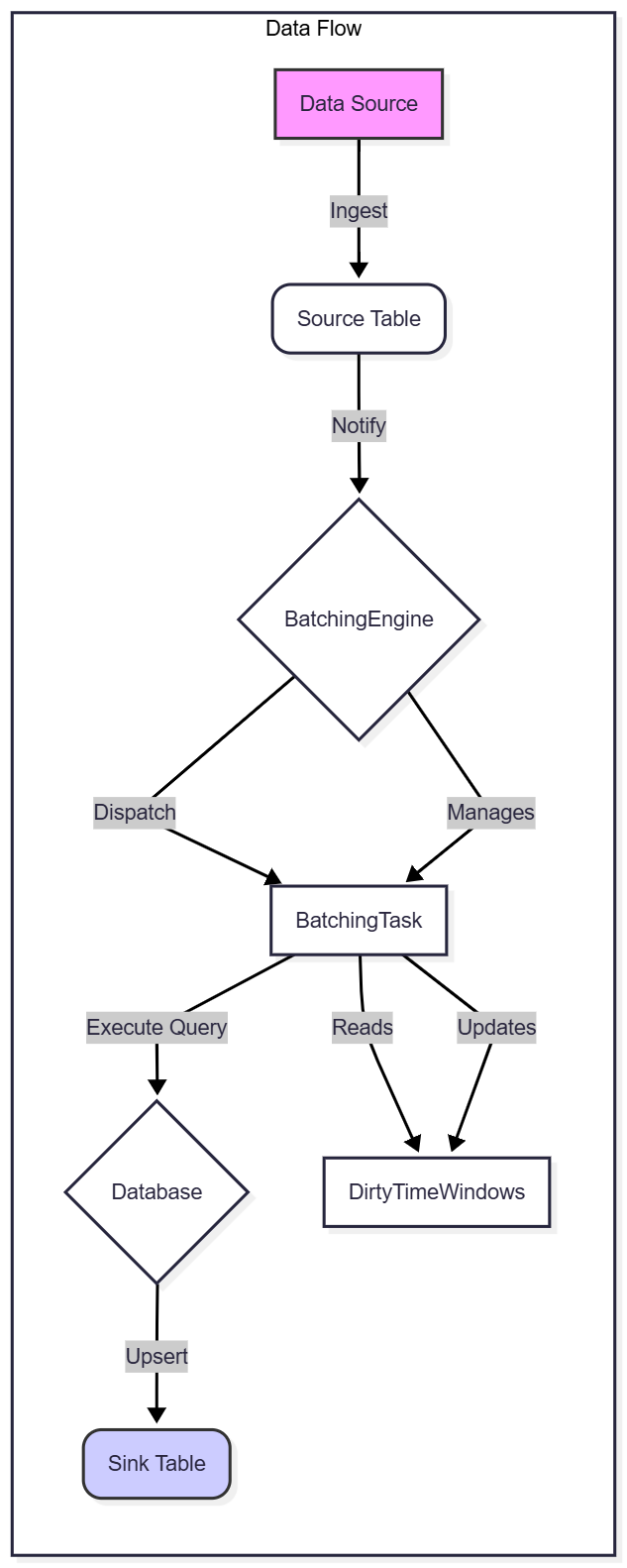
The batching mode consists of several key components that work together to achieve this continuous aggregation. As shown in the diagram below:
BatchingEngine
The BatchingEngine is the heart of the batching mode. It's a central component that manages all active flows. Its primary responsibilities are:
- Task Management: It maintains a map of
FlowIdtoBatchingTask. It handles the creation, deletion, and retrieval of these tasks. - Event Dispatching: When new data arrives (via
handle_inserts_inner) or when time windows are explicitly marked as dirty (handle_mark_dirty_time_window), theBatchingEngineidentifies which flows are affected and forwards the information to the correspondingBatchingTasks.
BatchingTask
A BatchingTask represents a single, independent data flow. Each task is associated with one flow definition and runs in its own asynchronous loop.
- Configuration (
TaskConfig): This struct holds the immutable configuration for a flow, such as the SQL query, source and sink table names, and time window expression. - State (
TaskState): This contains the dynamic, mutable state of the task, most importantly theDirtyTimeWindows. - Execution Loop: The task runs an infinite loop (
start_executing_loop) that:- Checks for a shutdown signal.
- Waits for a scheduled interval or until it's woken up.
- Generates a new query plan (
gen_insert_plan) based on the current set of dirty time windows. - Executes the query (
execute_logical_plan) against the database. - Cleans up the processed dirty windows.
TaskState and DirtyTimeWindows
TaskState: This struct tracks the runtime state of aBatchingTask, including thedirty_time_windowsthat determine its pending work.DirtyTimeWindows: This data structure tracks which time windows have received new data since the last query execution. It stores a set of non-overlapping time ranges. The execution loop uses it to build aWHEREclause that selects only the dirty windows from the source table.
TimeWindowExpr
The TimeWindowExpr is a helper utility for dealing with time window expressions like date_bin.
- Evaluation: It can take a timestamp and evaluate the time window expression to determine the start and end of the window that the timestamp falls into.
- Window Size: It can also determine the size (duration) of the time window from the expression.
The same calculation is used to mark dirty windows and generate the source-table filters.
Query Execution Flow
Here's a simplified step-by-step walkthrough of how a query is executed in batch mode:
- Data Ingestion: New data is written to a source table.
- Marking Dirty: The
BatchingEnginereceives a notification about the new data. It uses theTimeWindowExprassociated with each relevant flow to determine which time windows are affected by the new data points. These windows are then added to theDirtyTimeWindowsset in the correspondingTaskState. - Task Wake-up: The
BatchingTask's execution loop wakes up, either due to its periodic schedule or because it was notified of a large backlog of dirty windows. - Plan Generation: The task calls
gen_insert_plan. This method:- Inspects the
DirtyTimeWindows. - Generates a series of
OR'dWHEREclauses (e.g.,(ts >= 't1' AND ts < 't2') OR (ts >= 't3' AND ts < 't4') ...) that cover the dirty windows. - Rewrites the original SQL query to include this new filter, ensuring that only the necessary data is processed.
- Inspects the
- Execution: The modified query plan is sent to the
Frontendfor execution. The database processes the aggregation on the filtered data. - Upsert: The results are inserted into the sink table. The sink table is typically defined with a primary key that includes the time window column, so new results for an existing window will overwrite (upsert) the old ones.
- State Update: The
DirtyTimeWindowsset is cleared of the windows that were just processed. The task then goes back to sleep until the next interval.